Tutorial 05: Collision Checks With Dynamic Obstacles
This tutorial shows you how to use the drivability checker library in order to quickly check if multiple ego-vehicle trajectories collide with a set of dynamic obstacles.
1. Necessary imports
We begin by importing all necessary modules.
[1]:
%matplotlib inline
import numpy as np
import matplotlib.pyplot as plt
from time import time

# commonocean-io
from commonocean.prediction.prediction import TrajectoryPrediction, SetBasedPrediction
from commonocean.visualization.draw_dispatch_cr import draw_object
from commonocean.common.file_reader import CommonOceanFileReader
from commonocean.scenario.trajectory import Trajectory
from commonocean.scenario.state import GeneralState
from commonocean.scenario.obstacle import ObstacleType, DynamicObstacle

from commonroad.geometry.shape import Rectangle
from commonroad.visualization.mp_renderer import MPRenderer
import commonroad_dc.pycrcc as pycrcc

# commonocean-dc
from commonocean_dc.collision.collision_detection.pycrcc_collision_dispatch import create_collision_checker, create_collision_object
from commonocean_dc.boundary import boundary
from commonocean_dc.collision.trajectory_queries import trajectory_queries
2. Collision checks
We demonstrate the collision checking for the example of CommonOcean scenario.
[2]:
# scenario names for both considered scenarios
scenario_name_trajectory_prediction='CommonOceanDC_Tutorial.xml'

scenario, planning_problem_set = CommonOceanFileReader(scenario_name_trajectory_prediction).open()

for j in [0,50, 105, 150]:
    draw_object(scenario, draw_params={'time_begin': j, 'trajectory_steps': 0})
    draw_object(planning_problem_set, draw_params={'time_begin': j})
    plt.gca().set_aspect('equal')
    plt.show()
/home/maioneb/.conda/envs/co38/lib/python3.8/site-packages/commonocean/visualization/traffic_sign.py:159: UserWarning: No png file for traffic sign id TrafficSignElementID.LATERAL_MARK_RED_A exists under path /home/maioneb/.conda/envs/co38/lib/python3.8/site-packages/commonocean/visualization/traffic_signs/101.png, skipped plotting.
  warnings.warn(
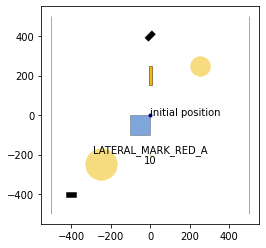
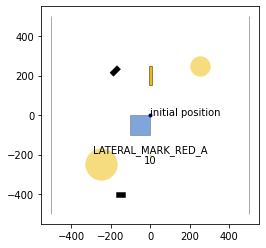
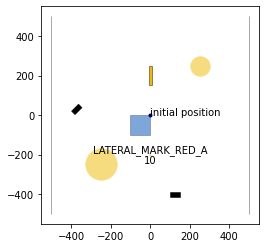
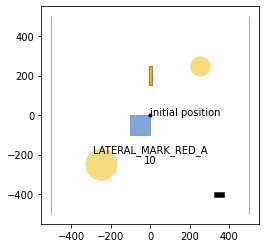
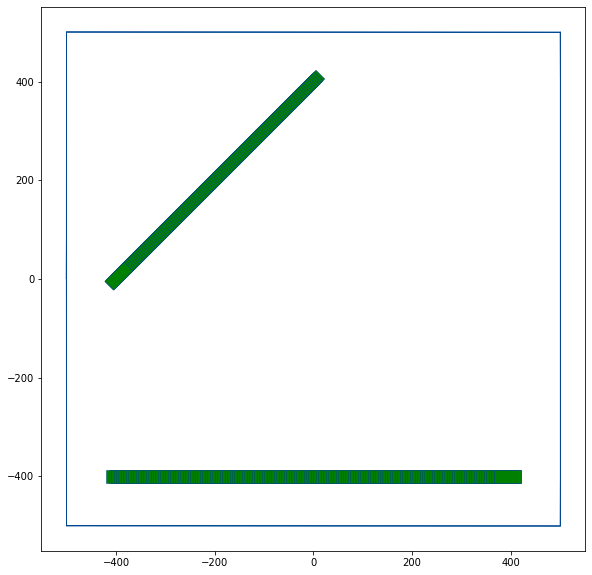
The first thing to be done is get the trajectories of the 2 dynamic obstacles that we have in this example scenario and transform it in a time-variant collision object.
The function get_scenario_dynamic_obstacles_list() returns the dynamic obstacles in the scenario as a list of Time-Variant Collision Objects.
[3]:
def get_scenario_dynamic_obstacles_list(scenario):
    dyn_obstacles_list=list()
    for dyn_obst in scenario.dynamic_obstacles:
        if isinstance(dyn_obst.prediction,TrajectoryPrediction):
            co=create_collision_object(dyn_obst.prediction)
            # preprocess using obb hull for continuous collision detection
            co, err=trajectory_queries.trajectory_preprocess_obb_sum(co)
            dyn_obstacles_list.append(co)
        else:
            if isinstance(dyn_obst.prediction,SetBasedPrediction):
                co=create_collision_object(dyn_obst.prediction)
                dyn_obstacles_list.append(co)
            else:
                raise Exception('Unknown dynamic obstacle prediction type: ' + str(type(dyn_obst.prediction)))
    return dyn_obstacles_list
[4]:
trajectories = get_scenario_dynamic_obstacles_list(scenario)
After loading the trajectory batch, we create the waters boundary (see Tutorial 03: road compliance checking for details). The scenario and its boundary are visualized below.
[5]:
waters_boundary_obstacle, waters_boundary_sg_triangles=boundary.create_waters_boundary_obstacle(scenario, method='triangulation')
waters_polygons = boundary.create_waters_polygons(scenario, method='whole_polygon', triangulate=False)

# Draw an exemplary part of trajectories (here: 2 trajectories) and the road boundary

rnd = MPRenderer(figsize=(25, 10))
waters_boundary_sg_triangles.draw(rnd)
for tvo in trajectories:
    rnd.draw_params.shape.facecolor = "green"
    tvo.draw(rnd)
rnd.render()
start: [[ 500. -500.]
 [-500. -500.]],left: [[-500. -500.]
 [-500.    0.]
 [-500.  500.]],end: [[-500.  500.]
 [ 500.  500.]],right: [[ 500.  500.]
 [ 500.    0.]
 [ 500. -500.]]
start: [[ 500. -500.]
 [-500. -500.]],left: [[-500. -500.]
 [-500.    0.]
 [-500.  500.]],end: [[-500.  500.]
 [ 500.  500.]],right: [[ 500.  500.]
 [ 500.    0.]
 [ 500. -500.]]
start: [[ 500. -500.]
 [-500. -500.]],left: [[-500. -500.]
 [-500.    0.]
 [-500.  500.]],end: [[-500.  500.]
 [ 500.  500.]],right: [[ 500.  500.]
 [ 500.    0.]
 [ 500. -500.]]
[5]:
[<matplotlib.collections.PatchCollection at 0x7f259eca8a30>]
2.1. Check if trajectory is within the road (static collision checking)
We can check the trajectory batch for waters-compliance by performing a static collision check with the waters boundary, as demonstrated in Tutorial 03: road compliance checking.
[6]:
# check computation time over ten runs
num_trials=10

cur_time_1=time()
for i in range(num_trials):
    valid_trajectories = 0
    ret=trajectory_queries.trajectories_collision_static_obstacles(trajectories, waters_boundary_sg_triangles, method='grid', num_cells=32, auto_orientation=True, optimize_triangles=True)
cur_time_2 = time()

print("%s out of %s checked trajectories don't collide with the road boundary." % (ret.count(-1), len(trajectories)))
print("Time for %s trajectory checks: " % (len(trajectories)) + str((cur_time_2-cur_time_1)/num_trials)+ " sec.")
2 out of 2 checked trajectories don't collide with the road boundary.
Time for 2 trajectory checks: 0.00015048980712890626 sec.
2.2. Dynamic collision checking
Now we must check if the vessels are colliding with each other during the scenario flow. For that, let’s create a dynamic_obstacle as reference of collision (we’re going to compare our trajectories with this new dynamic obstacle)
[7]:
# Creating dynamic obstacle
# (please check the CommonOcean-io to understand how to create a new dynamic obstacle from scratch)

initial_positions_dynamic_obstacles = [np.array([400,-400])]
goal_positions_dynamic_obstacles = [np.array([-400,-400])]
velocities_dynamic_obstacles = [5]
length_dynamic_obstacles = [50]
fraction_width_dynamic_obstacles = [2]
dt = 1

for n in range(1):

    initial_position_dynamic_obstacle = initial_positions_dynamic_obstacles[n]
    goal_center_dynamic_obstacle = goal_positions_dynamic_obstacles[n]
    velocity = velocities_dynamic_obstacles[n]
    heading = 3.141621
    dynamic_obstacle_initial_state = GeneralState(**{'position': initial_position_dynamic_obstacle, 'orientation': heading, 'time_step': 0, 'velocity': velocity})
    dynamic_obstacle_state_list = [dynamic_obstacle_initial_state]
    t_max_dynamic_obstacle = (np.linalg.norm(goal_center_dynamic_obstacle-initial_position_dynamic_obstacle)) / velocity
    t_end_dynamic_obstacle = int(t_max_dynamic_obstacle / dt)

    for t_i in range(1,t_end_dynamic_obstacle):
        # Computing new position
        new_position = dynamic_obstacle_state_list[-1].position + \
                    np.array([dynamic_obstacle_state_list[-1].velocity * scenario.dt * np.cos(dynamic_obstacle_state_list[-1].orientation),
                                dynamic_obstacle_state_list[-1].velocity * scenario.dt * np.sin(dynamic_obstacle_state_list[-1].orientation)])

        # Adding new state to dynamic_obstacle_state_list
        acceleration = 0
        dynamic_obstacle_state_list.append(GeneralState(**{'position': new_position, 'orientation': heading,'time_step': t_i, 'velocity': velocity, 'acceleration': acceleration}))

    # Creating the predicted trajectory starting at time step 1
    dynamic_obstacle_trajectory = Trajectory(initial_time_step=1, state_list=dynamic_obstacle_state_list[1:])

    # Creating the prediction using the predicted trajectory and the shape of the obstacle
    length = length_dynamic_obstacles[n]
    dynamic_obstacle_shape = Rectangle(length=length, width=length/fraction_width_dynamic_obstacles[n])
    dynamic_obstacle_prediction = TrajectoryPrediction(trajectory=dynamic_obstacle_trajectory,shape=dynamic_obstacle_shape)

    # Generating the dynamic obstacle according to the specification
    dynamic_obstacle_id = scenario.generate_object_id()
    dynamic_obstacle_type = ObstacleType.MOTORVESSEL
    dynamic_obstacle = DynamicObstacle(obstacle_id=dynamic_obstacle_id, obstacle_type=dynamic_obstacle_type,
                                obstacle_shape=dynamic_obstacle_shape, initial_state=dynamic_obstacle_initial_state,
                                prediction=dynamic_obstacle_prediction)

    # Adding dynamic obstacle to the scenario
    scenario.add_objects(dynamic_obstacle)
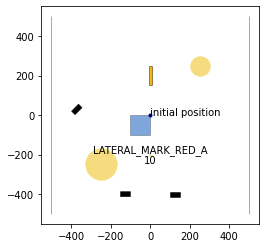
We created one vessel that directly collides with the dynamic obstacle in the bottom of our scenario, as you may see in the next plot.
[8]:
draw_object(scenario, draw_params={'time_begin': 105, 'trajectory_steps': 0})
draw_object(planning_problem_set, draw_params={'time_begin': 105})
plt.gca().set_aspect('equal')
plt.show()
/home/maioneb/.conda/envs/co38/lib/python3.8/site-packages/commonocean/visualization/traffic_sign.py:159: UserWarning: No png file for traffic sign id TrafficSignElementID.LATERAL_MARK_RED_A exists under path /home/maioneb/.conda/envs/co38/lib/python3.8/site-packages/commonocean/visualization/traffic_signs/101.png, skipped plotting.
  warnings.warn(
[9]:
# Selecting only the last dyn obstacle as reference
reference_dynamic_obstacles = [get_scenario_dynamic_obstacles_list(scenario)[-1]]
[10]:
# check computation time over ten runs
num_trials=10

cur_time_1=time()
for i in range(num_trials):
    res_dynamic = trajectory_queries.trajectories_collision_dynamic_obstacles(trajectories, reference_dynamic_obstacles, method='box2d')
cur_time_2 = time()

print("%s out of %s trajectories don't collide with the other vessels" % (res_dynamic.count(-1), len(trajectories)))
print("Time for %s trajectory checks: " % (len(trajectories)) + str((cur_time_2-cur_time_1)/num_trials)+ " sec.")
1 out of 2 trajectories don't collide with the other vessels
Time for 2 trajectory checks: 0.0003496408462524414 sec.
We obtained the expected result: only one of our trajectories collides with the referenced dynamic obstacle that we artificially created. If you want to have a more practical application and test the dynamic obstacles between themselves (without a fictional obstacle), it’s simple and the idea is the same, we must only select the reference of dynamic obstacle and compare with the trajectory, as shown in the next cell.
[11]:
reference_dynamic_obstacles = [trajectories[1]]
trajectories = [trajectories[0]]

num_trials=10

cur_time_1=time()
for i in range(num_trials):
    res_dynamic = trajectory_queries.trajectories_collision_dynamic_obstacles(trajectories, reference_dynamic_obstacles, method='box2d')
cur_time_2 = time()

print("%s out of %s trajectories don't collide with the other vessels" % (res_dynamic.count(-1), len(trajectories)))
print("Time for %s trajectory checks: " % (len(trajectories)) + str((cur_time_2-cur_time_1)/num_trials)+ " sec.")
1 out of 1 trajectories don't collide with the other vessels
Time for 1 trajectory checks: 0.0003221988677978516 sec.
As expected, the two initial vessels don’t collide between them. The logic to test scenarios with more than 2 vessels is the same: just be careful to select the reference obstacles and remove them from the tested trajectories, otherwise you will certainly have collision (a vessel always collide with itself).